Problem Based Learning Ideas for Middle School Science

A Problem Based Learning Activity is an open ended challenge that asks students to solve a problem or create a product incorporating skills or content they have mastered. Alternately, the PBL can be used to introduce skills or lead students to discover content on their own.

Problem based learning is student centered learning which increases motivation and achievement. PBLs also offer students the opportunity to practice time management and organizational skills. By creating their own connections to the content, students develop intellectual curiosity which helps them understand and retain the concepts.

Additionally, the open ended nature of the problem in a PBL allows for differentiation according to learning preference or skill set.

Many PBL activities can be adapted to suit many content areas. Here are some examples.

  1. Design a museum exhibit. In this sort of PBL, students are given the challenge to select items that represent the topic of choice and to design how these items would be showcased in a museum exhibit. Here is a museum exhibit PBL I use for simple machines but it could easily be adapted to demonstrate mastery of anything from ancient Egyptian culture to the development of the space program.
  2. Design a game. Using the content they’ve mastered, students design a simple game that reviews the content. A simple version of this is a file folder game but it can be as elaborate as a whole class game show.
  3. Create an advertisement. If you have video equipment, or even cell phones, available for your students, they can write, perform, record, and edit a 30-90 second advertisement for a product that reflects the unit you’re studying. Here is an advertisement PBL I’ve used for simple machines but this is easily adaptable for content such as weather instruments, book reviews, or political campaigns for historical figures.
  4. Design a habitat. This is a great activity for teaching ecosystems, food chains, and biomes. I’ve used it as a capstone activity in an endangered animals unit. Students research an endangered animal and design a habitat for a zoo to protect the animal. Another way to implement this idea is to apply a concept to a new location. For example, students can research alternative energy sources and choose one for the imaginary island they’ve just inherited.
  5. Field Trips or Vacations. Students enjoy creating a travel brochure or vacation itinerary to explore a culture or location. This is useful when learning about a historical culture or a geographically distant location. I’ve used it in my solar system unit but it would work just as well for an exploration of the Aztecs or of Antarctica.
  6. Relate it to sports. Many topics can be related to sports which is highly engaging for students. It’s a natural fit for Newton’s Laws but can also be used for many physical science topics such as d=rt, momentum, and energy conversions.

Photo by Pragyan Bezbaruah from Pexels

Halloween Science

Middle school classrooms are scary places……especially on Halloween. Here are 3 activities to keep your ghouls entertained.

SPIDERS! – This week long mini unit explores the characteristics and classification of spiders. Each day includes complete lesson plans and everything you need to implement the lesson.

  • Day 1 – spider fact or fiction, spider anatomy
  • Day 2 – spider research
  • Day 3 – spider species picture walk and invertebrate identification activity <– try this mini unit by downloading a free copy of the invertebrate identification activity! 
  • Day 4 – review, crossword puzzle
  • Day 5 – STEM activity building a spider web

Zombie Digital Escape Room – If you’re still working remotely or if you need to keep your kiddos socially distanced, engage them in group work that can be completed separately but together. A digital escape room with a Halloween theme will help them practice communication and problem solving skills, build relationships, and develop a growth mindset if it is appropriately challenging. This one is designed to save the world from zombies but there are thousands of variations on the theme.

Digital Escape Room - Zombies!

Halloween Themed scientific literacy – If games aren’t your thing, or if you need to have seat work in the lesson plans, use the Halloween theme to engage students in a close reading of informational text. I have two on hand – one on spiders and one on bats – that I can bring out for enrichment purposes, sub plans, or for early finishers. They are engaging and help students practice reading and analyzing informational text to build scientific literacy.

Halloween Themed Hands on Activities There are, of course, hundreds of labs you can do with candy. My school has a no-candy policy, and, for pandemic purposes, it is more strictly enforced this year than others, so that’s a no-go for me. Instead, try these two activities:

  • Fake Blood STEM project – Students compete to create the most realistic fake blood using a pre-measured goody bag of materials such as corn syrup, food dye, and cocoa powder. Keeping a lab notebook makes it more of a scientific method inquiry than just a random mess making session. Voting on the best blood is one of the most memorable moments of the year.
Halloween STEM - Use the scientific method to make fake blood!
  • Apple mummies – Fun project that takes a week or two from beginning to end so you’ll need to plan in advance. Students select materials to mummify an apple slice and then use measurement skills to compare the water content before and after a week of mummification. Stickers or candy to the person whose apple lost the largest percentage of water.
Halloween Science - Make a Mummy!

Halloween Themed Worksheets

Any topic can be turned into a Halloween themed worksheet. Here are two I have used:

Plate Tectonics Digital Silly Story Worksheet for Halloweencell organelles halloween magic pic cover and thumbs

Balancing Equations Self Checking Worksheet for Halloween


What’s your favorite Halloween project for middle school science?

Using Phenomena to address NGSS and engage students

What are phenomena?

The Next Generation Science Standards (NGSS) define phenomena as observable events or occurrences that can be investigated scientifically. Phenomena serve as the foundation for engaging students in the process of scientific inquiry and understanding key scientific concepts. These phenomena can be natural or man-made and can range from simple to complex, spanning across various scientific disciplines. Middle school science teachers can use phenomena to increase engagement in middle school science!

Phenomena in NGSS are used in middle school science to anchor the learning experiences and provide a context for students to develop and apply their scientific knowledge and skills. By exploring phenomena, students are encouraged to ask questions, make observations, analyze data, construct explanations, and engage in argumentation based on evidence. Phenomena enable students to connect scientific concepts to real-world situations and foster a deeper understanding of the natural world.

How to use phenomena to increase engagement in middle school science

Anchoring an NGSS aligned lesson with a phenomenon can help engage students and help them make connections between observations and understanding. Phenomena used at the start of a lesson builds inquiry skills toward learning the science knowledge that explains it. Using phenomena makes learning more meaningful for your students.

 use phenomena to increase engagement in middle school science

But how do we use phenomena? Here are some ideas:

  • Introduce Compelling Phenomena: Start the lesson with a captivating real-world event, puzzling observation, or intriguing question that sparks students’ curiosity. This can be done through videos, images, demonstrations, or interactive experiences.
  • Do a demo or post an image or video of a relevant object or discrepant event and ask students to discuss, predict, or explain. Refer to the images throughout the lesson, building connections and strengthening understanding.
  • Use images that build on familiar experiences to allow students more ownership of and connection to their learning.
  • Connect to Students’ Prior Knowledge: Relate the phenomenon to students’ own experiences, interests, or familiar concepts. This helps them make connections and see the relevance of the phenomenon to their lives.
  • Encourage Questions and Wondering: Prompt students to generate questions and express their wonderings about the phenomenon. This promotes active engagement and sets the stage for inquiry-based learning.
  • Engage students in communication their ideas about the phenomenon through writing.
  • Phenomenon that can be guessed, googled, or explained in only one class period may be too simplistic. Phenomenon should build knowledge in layers that strengthen connections.
  • Provide Hands-On Investigations: Design activities and experiments that allow students to explore and investigate the phenomenon firsthand. This hands-on approach encourages active participation and deepens understanding.
  • Collaborative Learning: Foster collaboration among students by assigning group projects or discussions centered around the phenomenon. This encourages peer-to-peer interactions, critical thinking, and problem-solving skills.
  • Use Multimedia and Technology: Incorporate multimedia resources, simulations, virtual labs, and interactive online tools to enhance students’ engagement and provide additional avenues for exploration.
  • Incorporate Crosscutting Concepts: Highlight the crosscutting concepts (such as patterns, cause and effect, systems, etc.) associated with the phenomenon. This helps students see connections across different scientific disciplines and strengthens their understanding of the underlying principles.

Where can I find phenomena to use in middle school science?

Since the adoption of the NGSS, many digital collections of phenomena have been developed. Two of my favorites are:

  • Phenomena for NGSS – This collection appears endless to me, despite my hours invested in trying to see everything! Photos and gifs are searchable by topic. I couldn’t think of a topic that I couldn’t find an image for.
  • The Wonder of Science – This site has collections of storylines, learning plans, images and videos for each standard with links to the evidence statements. A truly exhaustive collection.
 use phenomena to increase engagement in middle school science

Beehive Photo by icon0.com from Pexels

Aurora Photo by Landon Arnold on Unsplash


Twitter Professional Development

This is a lonely profession, even without a pandemic. Teachers who have a professional learning community to plan lessons, bounce ideas off, and review strategies are lucky but most of us labor alone at our desks. But there’s a vibrant community of teachers online that you can access around the clock for help on quite literally everything and anything.

If you don’t have a Twitter account, get one! It’s simple at twitter.com.

Who to follow?

  • There are tons of teachers out there who are tweeting fascinating and exciting things – and a few tons of teachers who need help. Try searching for hashtags. Here’s a list to get you started:
    • #edchat
    • #elearning
    • #pbl
    • #pblchat
    • #ntchat (for new teachers)
    • #gbl (game based learning)
    • #edtech
    • #21stedchat
    • #middleschool
    • #inquiryed
    • #scichat
    • #scienceteacher
    • #scied
    • #iteachscience
    • #scienceliteracy

Twitter Chats

Twitter chats are regularly scheduled meetups around specific topics. There are some that are very active and attract dozens of participants and hundreds (thousands) of lurkers every week. There are some that are just started or growing slowly. During the scheduled chat time, participants use a prescheduled hashtag to keep track of the conversation which sometimes moves very quickly.

Here are some popular Twitter chats for teachers:

  • #edchat – meets Tuesdays at 12PM and 7PM est
  • #edtechchat – meets Mondays at 8pm est
  • #mschat – meets Thursdays at 8PM est
  • #ntchat – for new teachers, meets first and third Wednesdays at 8PM est
  • #scichat – hosted by The National Center for Earth and Space Science Education on Tuesdays at 9PM est
  • #scitlap – science based weekly chat based on Teach Like a Pirate on Mondays at 9PM est.
  • #NGSSchat – first and third Thursdays at 9PM est

Join in and make some connections!

Advanced Boom Cards

If you’ve been playing with Boom cards a little while, you probably have seen some decks that use a drag and drop feature. It’s a little more interesting for students than the simple multiple choice questions so today let’s take a look at how to create a drag and drop question.

Drag and drop features have many options. An easy one to start with is “Drag the correct answer here,” which essentially function like multiple choice cards. Another one is “Label the picture with the correct words.”

Here’s how to use the drag and drop feature for a multiple choice question:

  1. Create your template card.
  2. Write a question including the directions to drag the answer somewhere. In this example, I’ve used a rock as my “Drop Zone.”
  1. The answer choices must each be in their own Button, Text box or Image. In this example, I’ve used buttons.

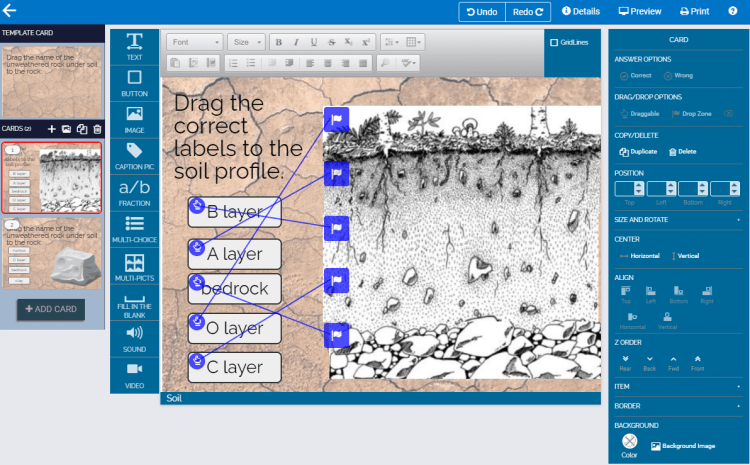
4. Click on the image or location you want to be your Drop Zone and then click on the “Droop Zone” option on the right menu. A little purple flag will appear in your Drop Zone to show you that you’ve finished this step.

5. Click on all of your buttons (Shift and hold as you click each one to select them all at once). Then, click the “Draggable” option on the right side menu. A small round Drag icon will appear on each button to show you that you’ve completed this step.

6. To choose the correct answer, click on the Drag icon on the correct answer and drag it to the Drop Zone flag. A purple line will appear to show you that you’ve connected the correct Draggable to the Drop Zone.

7. When you Preview this slide, you’ll see that the other 3 buttons are wrong when you drag them to the Drop Zone but the button you’ve chosen as correct gets you the Ding for correct.


Here’s how to use the drag and drop feature to label a diagram:

  1. Write your question. If you insert an entire diagram as your drop zone, then any place in the diagram will be correct. If you want each piece of the diagram to be labeled differently, you have to insert the diagram in pieces. Tag each piece of the diagram with a Draggable flag.

2. Add the labels as Text, buttons, or images and tag each of them as Draggable items.

3. For each Draggable, click on the Drag icon. Then, drag and drop it onto the correct Drop Zone flag. Lines will appear connecting the answers to the diagram.

4. Check in the Preview tab that you’ve marked everything correctly.


Comment with a link to the preview of your advanced Boom Cards so we can all admire what you’ve created!


Boom cards available in my TpT Store:

Life Science

Physical Science

Earth Science


Healthy School Lunches

It’s that time of year again.

Here are the recipes making their way into my lunch rotation:

Salad. Gets boring fast. I try to add something special – feta cheese or pecans (or both) so that every day isn’t the same.

Burrito Bowl – Technically a salad, I suppose. Stack scoops of guacamole, beans, corn, greens, and salsa verde. Pack a zipper baggie of chips if you’re feeling indulgent (and I probably am).

Hummus and pita – I make my own pita (1 cup self rising flour plus 1 cup fat free plain Greek yogurt – shape into pitas and brown on both sides in a Pam-sprayed pan). A little pita and some veggies and I’m good.

hummus chickpeas appetizer free photo

Goat cheese Sandwiches – My new favorite thing in the world. I make some pita (see above) and assemble this open faced sandwich at my desk. Smear some goat cheese on top then cover with greens (arugula and spinach are my fav) and some sauteed onions (if I happen to have some) and some chopped tomatoes. Ooh – add a few olives. Best lunch ever.

Chili. I make a big pot on Sunday and divide it up into containers for the week. I don’t really have a recipe – it’s more of a “add whatever you have” kind of dish for me. Here’s the way I make it.

chili, bowl, food, pot, dutch, oven, beans, beef, carne, cooking
  1. Saute your meat in a little olive oil in your biggest and heaviest pot. You could use ground turkey, beef or chicken, or you could use some beef chuck or sausage. Or skip the meat. Up to you. When it’s browned, take it out of the pot and set it aside for a bit. Skip this step if you want vegetarian chili.
  2. Chop an onion, a bell pepper (whatever color you’ve got, or add 2 if you want), a few ribs of celery and a few carrots. Saute in olive oil in your biggest and heaviest pot. Add a few chopped cloves of garlic.
  3. At this point, you can add a bulb of celeriac, butternut squash, acorn squash, or a turnip if you want. If you add any of these, add a cup or two of broth (veggie or chicken or beef – whichever you like or have on hand, or use water if you want) and let simmer, covered, for 20-30 minutes.
  4. Add a big can of tomatoes (crushed, chopped, or whole – up to you), the beans (2-3 cans of whatever you have) and the spices. I use about 2 tablespoons of chili powder, a teaspoon each of cumin, oregano, and paprika and about 1/2 teaspoon of red pepper flakes. But shake it up – add what you like! Add the meat and, if you want, a can of corn, peas or green beans at this point.
  5. Depending on how wet you like it, this can simmer covered (if you like it wet) or uncovered (if you like a chunkier chili) for half hour or so. So simple and incredibly versatile.
  6. Serving options: over rice, over quinoa, with tortilla chips, or with corn bread. Dollop of sour cream or fat free yogurt on top. Sprinkle some shredded cheddar, chopped scallions.

Back To School Night

What are parents looking for when they come to your (in person or virtual) back to school night?

Our administrators think parents are looking for concrete information on how you will be assessing and grading their children and what specific content you will be covering.

Sure, they want that.

But what parents really want is this.

Woman Teacher clipart

They want to know that you like their child. That their child will be safe with you. That you want to help their child. That you are engaging and compassionate and passionate about education.

How can one person convey all of that? It’s easy. If you really do like their child and their child really will be safe with you and you really want to help their child, it will come through without you even trying. If you are engaging and compassionate and passionate about education, you will convey that easily. Those are not things you can fake.

Here are some ideas to fill the time on back to school night:

  • Slide Show – Slide shows are great ways to remember what you need to say when you might be wrestling some nerves. I always include:
    • My name and info like education, experience, etc
    • Contact info – How do you prefer to be contacted? What are your email address and phone number?
    • Curriculum – What will we be studying this year?
    • Grades – How will your students be assessed? How can parents see their student’s grades? When should they expect to get grades back?
  • Handout – Back to school night is overwhelming for parents also. Especially in the middle school ages, parents have to meet 4 or 5 or even more new teachers and they’re going to be on sensory overload. They’ll forget things like how to contact you or what school supplies their child needs. Help them out by providing a handout with all that info on it. 
  • QR codes – Instead of handouts, give parents an index card with a QR code leading to your About Me internet page where you give them the lowdown on how to contact you, what school supplies they need, and what the curriculum is.
  • Sign in – Parent sign in is critical. You’ll forget which parent you met and which asked you to contact them. Have a sign in sheet and then write notes on it as soon as parents leave. 

Stations for Back to School Night

Show the parents what being in your class is going to be like. Have them rotate around your classroom, completing various activities at each stations. Here are stations I use:

  • School supply list – What materials will Suzie need to be successful in your class? Have copies of a printed list or have a QR code to bring them to your supply list website. I like to have sample binders, pencil cases, etc available for parents to see what I’m looking for.
  • Write a note to your child. This is really an elementary activity, but middle school parents (and kids) find it fun too! Have parents write a quick note to their child (“I’m proud of you” is a standard) and leave it in an envelope on the child’s desk for them to see the next day.
  • Curriculum. At this station, parents can pick up a handout on the curriculum and participate in a quick lab such as:
  • Meet the teacher. After parents have completed all of the other stations, I greet them with a handshake and a smile and ask if they have any questions. If they have more than a simple question, I point them to a “Sign up for a conference or phone call” QR code where they can input their name and what kind of information they need from you. This helps move the evening along and keeps you from getting bogged down with Johnny’s parents who want to tell you all about their son’s hobbies.

Good luck. They’re going to love you.

Simple Machines

A simple machines unit is a great one to teach using a constructivist approach. With some hands on experimentation, students can see the impact that using a lever or inclined plane has on work. Direct instruction to incorporate vocabulary supplements the observations students have made and allows them to draw conclusions about how simple machines work.

A few pieces to include in your simple machines unit:

  1. Direct instruction. Here, I use a slide show and cloze notes and focus on vocabulary.
  1. Experimentation. Using a few blocks of wood, some meter sticks, a spring scale, a pulley, and a binder clip, students can experiment with levers, pulleys, and inclined planes. Depending on the level of student, you can provide as much or as little guidance as they need. Here is a simple inclined planes lab I use. It allows students to compare the mechanical advantage of a short inclined plane and a long inclined plane and determine how effort distance and effort force are related in work input. This lab is a more complicated lab exploring levers using a constructivist approach. Students build 1st, 2nd and 3rd class levers and then arrange the fulcrum, effort force, and load into various configurations to see how the positions affect mechanical advantage, leading to an understanding of the different ways machines make work easier.
  2. Practice with vocabulary. I use a word map activity and a Boom Card activity to reinforce the vocabulary.
  1. Problem based learning projects:
    1. Machines in history. Have students research the top 5 most important machines (or top 10, or 5 most influential, or 8 most important from this century…) and design a museum exhibit explaining them.
    2. Kinetic sculpture project. Use what you learned about simple machines to create a kinetic sculpture. Incorporate environmental learning by using recycled materials.
    3. Machine advertisement. Create a 45 second video ad convincing people that they need to buy your simple machine.
  2. Final project – Catapult creation. Use what you learned to build a catapult that will propel a mini-marshmallow the farthest.

Each of these activities can be found separately on my TpT store or grouped together as a bundle.

Strategies to Teach and Reinforce Vocabulary

Teaching science is a lot like teaching a new language. Good pedagogy and engaging, relevant hands on activities can help students understand concepts, but the vocabulary often remains elusive. Here are five strategies to teach and reinforce science vocabulary:

  1. Preteach. Give students an opportunity before you teach the content to explore the vocabulary with flash cards, vocabulary games, and just rote memorization.
  2. Word walls. Typically thought of as an elementary school trick, word walls can work in middle school also. Post the new words – either as you introduce them or all at once. Refer to the word wall often – seeing the word in writing is reinforcement.
  3. Word maps. For each vocabulary word, have students write the textbook definition of the word and the definition in his or her own words. Then, have the students write a sentence that demonstrates their understanding of the word and draw a picture representing the word. I’ve created a few word map interactive Google Slides activities if you want to see some examples.
  1. I have, who has. This fantastic game is great for a 5 minute whole class review. It takes a little bit of time to set up, but you can laminate the cards and use them forever. Each card says “I have” and then a vocabulary word. Underneath that, each card says “Who has” and a definition. Or, vice versa. I usually keep one card to myself and hand out the others – great if you have a few extras to give 2 or 3 to fidgeters to keep them engaged. I start by reading my “Who has,” and then the student with the “I have” that matches it shouts out “I have” and then the word. Then, that student reads his or her “Who has” and so on. Download my free template here.
  1. Gamify it. Charades, Taboo, and Hangman are obvious choices, but Connect 4 (place a piece in the game board when you get a question right), Chutes and Ladders (move ahead 1 place if you get the question right) and Checkers (get a question right before you can take a turn) are all great options.
  2. Magic Picture Reveal Vocabulary Digital Worksheets. When students get the answers correct, pixels of a magic picture are revealed. When all of the questions are correct, the whole image is visible. Read more about magic pictures here.